04FRIEND'S BRAND DEMO
WAKOU SELECT
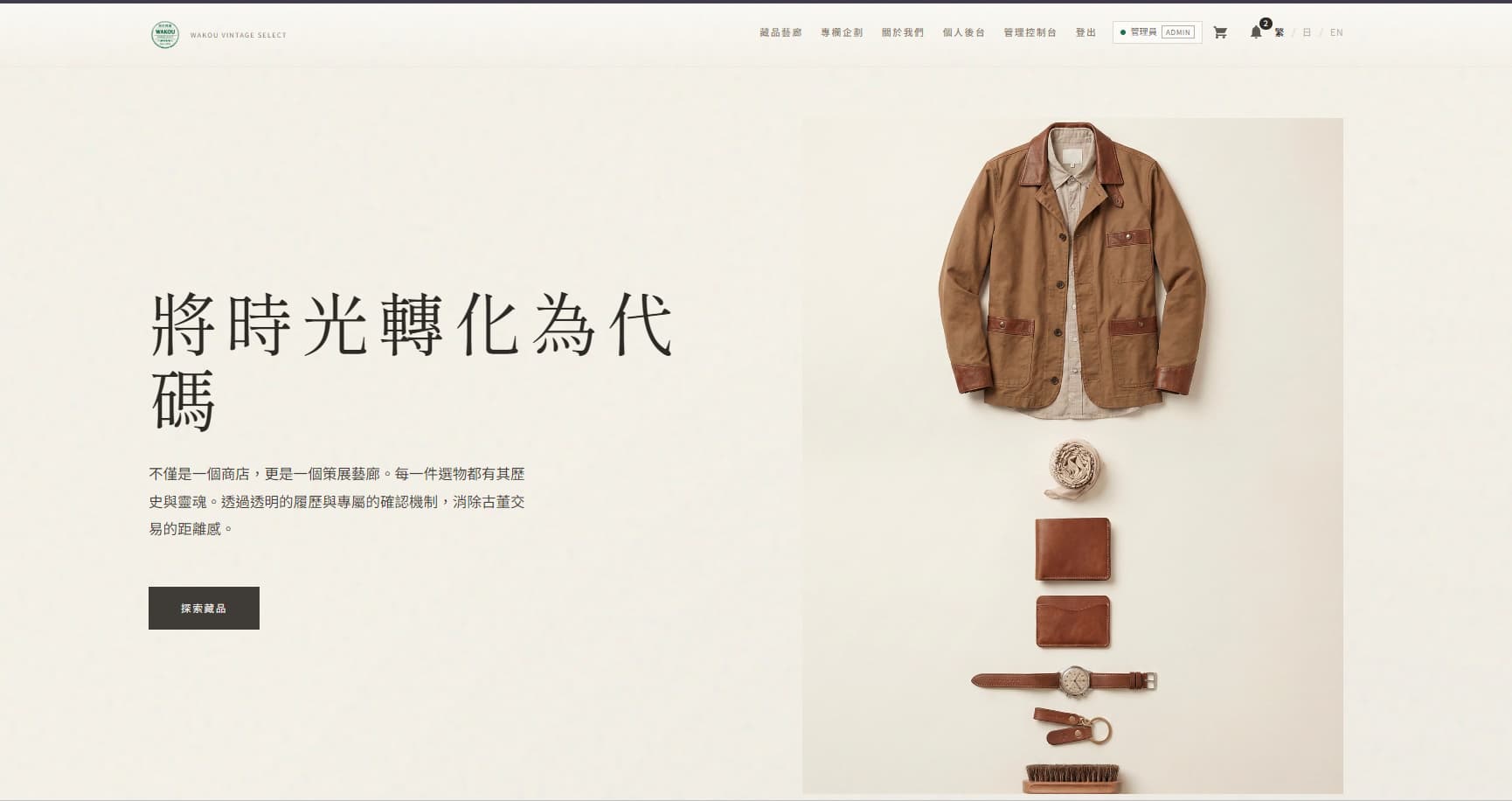
A public brand demo I designed and built for friends. It is not yet operating as a full service, and actual sales remain on third-party platforms.
2025 - 2026
01
A place for a friend's selection.
A demo for a friend’s brand, introducing its products and main services.
My friends work with luxury and secondhand goods. I brought their brand introduction, product display and services — purchase, care, authentication and resale — into a website demo. This was a project for their brand, rather than a client commission.
purchase, care, authentication and resale
Selection logic
PURCHASE / CARE / AUTHENTICATION / RESALE- 01PURCHASE
Purchase
Where choosing begins.
- 02CARE
Care
Keeping what is chosen.
- 03AUTHENTICATION
Authentication
Checking that it is genuine.
- 04RESALE
Resale
Passing it on.
What to choose, how to choose it, how to verify it, and how to pass it on.
02
Start by understanding the brand and its needs.
Understand what the brand wants to communicate before designing the screens.
I asked my friends how they choose products and what they want the brand to feel like. From there, I worked out how to show the photos, what to explain first and how much space the screens need.
LISTENING
What to communicate / Information architecture01
The product should convey its value
Product photography, information hierarchy and brand whitespace.
02
A first-time visitor should feel able to ask
Product condition, detail information and an official presence.
03
The purchase button is not the end
Enquiry, one-to-one consultation, detail confirmation and a final quotation.
03
Fix the direction of choosing first.
Make categories and product information easy to follow.
The current focus is a clear introduction to the products and services, with SEO and metadata that describe each page. Order handling, shipment and tracking are possible extensions, rather than a completed transaction system.
FIG-W1
01SELECT
Selection
02AUTHENTICATE
Prepare and verify
03CONSULT
Consultation
04DELIVER
Delivery
DIRECTION
SELECTION / TRACKING / DISCOVERY01SELECTION
Selection
Present purchase, care, authentication, and resale as the flow of choosing.
02TRACKING
Future orders and shipping
Plan orders, shipment and delivery tracking when the business needs them.
03DISCOVERY
SEO / metadata
Write clear page titles and descriptions so the site is easier to find.
04
Build in stages and check each part.
Start with the product pages and service information.
I organized the categories and screens, wrote the product and service descriptions, then checked the interactions. I focused on what the demo needed instead of building payment and shipping all at once.
ITERATION
IA / PROSE / FLOW- 01
Information architecture
Organize the product categories and display order first.
- 02
Product and service descriptions
Explain the products and services in clear, short descriptions.
- 03
Check demo interactions
Check product browsing and enquiry without presenting unfinished payment as a delivered feature.
Check categories, descriptions and demo interactions in stages.
05
Turn the product and service presentation into a working website.
Vue 3, Vite, Pinia, Router, and i18n with FastAPI and MySQL 8, carried by Docker Compose and Nginx.
Vue 3 and Vite handle the screens, Pinia the state, Router navigation and i18n languages. FastAPI handles the backend and MySQL 8 stores the data, with Docker Compose and Nginx organizing the runtime.
CONSULTATION FLOW
FIG-W301
Product
02
Enquiry
03
One-to-one consultation
04
Details / negotiation
05
Final quotation
06
Subsequent transaction
The intended service flow. The complete own-platform payment and shipping flow is unfinished; actual sales still use existing external platforms.
BUILD
Vue 3 / FastAPI / MySQL 8 / Docker01Vue 3
Selection views
Shape the selection experience with Vite, Pinia, Router, and i18n.
02FastAPI
Backend API
Handle the demo backend; formal payments and a complete shipping system are not implemented.
03MySQL 8
Data storage
Store the product and interaction data needed by the demo.
04Docker
Compose and Nginx
Organize the services with Docker Compose and Nginx for startup and deployment.
BUILD
WAKOU / 05How the interface, backend and data storage fit together.
06
The demo is ready; the next step depends on the brand’s needs.
The public demo introduces the brand, products and main services. Actual sales still use external platforms such as Shopee, Mercari and Yahoo!.
The brand’s current business volume does not yet call for operating the site as a full service. I have built a demo they can show and use. Own-platform transactions, formal payments and complete shipping are not implemented; these can be added around their actual workflow if the business grows.
This project clarified that shaping a brand impression and designing its operating system are different jobs. I finished the part that can be shown first, leaving transactions and shipping to a later, real need.
NEXT
01
Built so far
Ready in the public demo: brand introduction, product display and main service experiences.
02
Current transactions
Current transactions use external platforms such as Shopee, Mercari and Yahoo!.
03
Next extension
Next: decide on own-platform transactions, payment and shipping as operating needs grow.
A note on the project
WAKOU / 06Extend the demo when the brand needs its own service.