02 / 07GRADUATION PROJECT · TEAM OF 4
NOTERA AI
Class, video and image material, arranged into readable notes with AI.
01
IDEA
It began with one direction only.
What if the information in class, videos and images could be arranged into readable notes by AI?
Starting the work showed the hard part was not asking AI to summarize, but deciding what to keep, how images are understood, how code survives, and how a team finishes within the time.
IDEA FLOW
VIDEO / IMAGE / SLIDE → AI → NOTE- 01
Video / Image / Slide
Video / image / slide
- 02
AI
AI reading
- 03
Note
Readable note
THREE PARTS
01VIDEO / IMAGE / SLIDE
Video / image / slide
Bring the class material in as it is.
02AI
AI reading
Read text together with the visuals and organize the content.
03NOTE
Readable note
Arrange it into structured notes.
CHAPTER NOTEOne direction was easy; deciding what goes inside it was the hard part.NOTERA / 01 · IDEA
02
SCOPE
Many wants, so choose first.
We split the work into WANT / MUST / LATER and first fixed a scope that could finish in the time we had.
We could not do everything, so we separated what stays from what waits.
SCOPE SHEET
WANT / MUST / LATER| WANTWANTED |
|
|---|---|
| MUSTREQUIRED |
|
| LATERLATER |
|
SCOPE RULE
WANT / MUST / LATER01WANT
What we wanted
The wide starting direction; the cut starts here.
02MUST
Conditions for finishing in time
Image and video processing, structured notes, multilingual code content, and a demo.
03LATER
What waits
Three items placed outside the scope; return to them later.
CHAPTER NOTEMore features is not better; making the main flow actually run came first.NOTERA / 02 · SCOPE
03
TEAM
As team lead in a team of four, I helped set the direction and took part in the development.
As team lead, I helped shape the topic and overall architecture, then implemented my assigned parts; teammates supported research, the report and the presentation.
Not everyone needed to do the same work from the start; we first put into words what to build and how far to go.
RESPONSIBILITY MAP
TEAM OF FOURMy responsibilities as team lead
- 01IDEATopic proposal
- 02ARCHITECTUREOverall architecture
- 03INTEGRATIONIntegration calls
Teammates’ responsibilities
- 01DOCUMENTMaterial and reports
- 02TESTDelivery checks
- 03PRESENTATIONPPT and presentation
WHAT EACH SIDE DID
DEVELOPMENT / MATERIAL01My responsibilities as team lead
IDEA / Topic proposal
Frame the question and set the main concept.
02My responsibilities as team lead
ARCHITECTURE / Overall architecture
Decide the design and development direction.
03My responsibilities as team lead
INTEGRATION / Integration calls
Align the joins and make the final calls.
04Teammates’ responsibilities
DOCUMENT / Material and reports
Organize the material into the report.
05Teammates’ responsibilities
TEST / Delivery checks
Support the checks before delivery.
06Teammates’ responsibilities
PRESENTATION / PPT and presentation
Prepare the PPT and presentation material.
CHAPTER NOTEMy job was not to finish everything alone, but to fix the topic and architecture first and point four people's work at the same outcome.NOTERA / 03 · TEAM
04
PLAN
Cut the work to a size that finishes in time.
We did not each start writing our own part first; we confirmed how the material comes in, how it is processed, and how it is finally seen.
PROJECT TIMELINE
RESEARCH → UI → CORE → DOCS → PRESENTATION01RESEARCH
Check how material enters.
02UI
Implement how it is shown.
03CORE
Connect the whole.
04DOCS
Organize material and the report.
05PRESENTATION
Prepare the PPT and presentation material.
THREE QUESTIONS
IN / PROCESS / VIEW01IN
How material comes in
Fix the input shape first.
02PROCESS
How it is processed
The reading and arranging path.
03VIEW
How it is finally seen
Include the notes view in the plan.
CHAPTER NOTEFixing the order kept the work moving inside a fixed timeline.NOTERA / 04 · PLAN
05
BUILD
The flow from input to notes.
What we built is one flow: INPUT → UNDERSTAND → ORGANIZE → OUTPUT.
Rather than listing technology names, we made where things connect visible.
BUILD FLOW
INPUT → UNDERSTAND → ORGANIZE → OUTPUT- 01
INPUT
Video / image input
- 02
UNDERSTAND
Text and visual recognition
- 03
ORGANIZE
Summarize and de-duplicate
- 04
OUTPUT
Structured notes
Vue 3 / FastAPI / Local AI / Docker
FOUR STEPS
01INPUT
Video / image input
Load video and images as they are.
02UNDERSTAND
Text and visual recognition
OCR and a VLM (vision-language model) read the text and visuals together.
03ORGANIZE
Summarize and de-duplicate
Choose what is kept.
04OUTPUT
Structured notes
Arrange it into a readable form.
CHAPTER NOTEOnce the joins were visible, it was clear where the flow was stuck.NOTERA / 05 · BUILD
06
DECISIONS
From OCR-first to VLM-First; audio becomes slides only.
What mattered was not what we ended with, but how we changed course midway.
We replaced the center of the reading and narrowed the material; both moves protected the main flow within the limited time.
TWO TURNSOCR-first → VLM-First
Audio + slides → slides only
DECISION 01
OCR-first → VLM-FirstBEFORE
- OCR
- language/text decision
- notes
AFTER
- Screenshot + OCR
- VLM analysis
- notes
Code, English and mixed-language content was easily dropped by mistake.
WHY IT MOVED
OCR-first → VLM-First01
What was wrong
Code, English and mixed-language content was easily lost.
02
What changed
Analyze screenshot plus OCR with a VLM, reading text and visuals together.
DECISION 02
Audio + slides → slides onlyBEFORE
- Audio + slides
- decision
AFTER
- Slides
- output
The recorded audio was poor and did not work.
WHY IT MOVED
Audio + slides → slides only01
What was wrong
We tried to use audio and slides together, but the audio quality was bad.
02
What changed
We changed to slides-only output.
CHAPTER NOTEChoosing to make the main path run first was the biggest decision in the project.NOTERA / 06 · DECISIONS
07
RESULT
Close with the real demo.
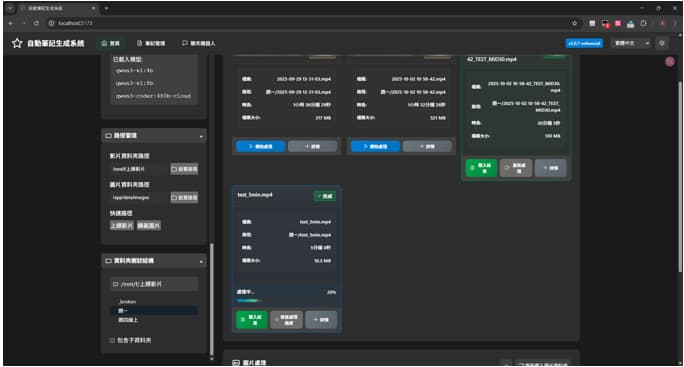
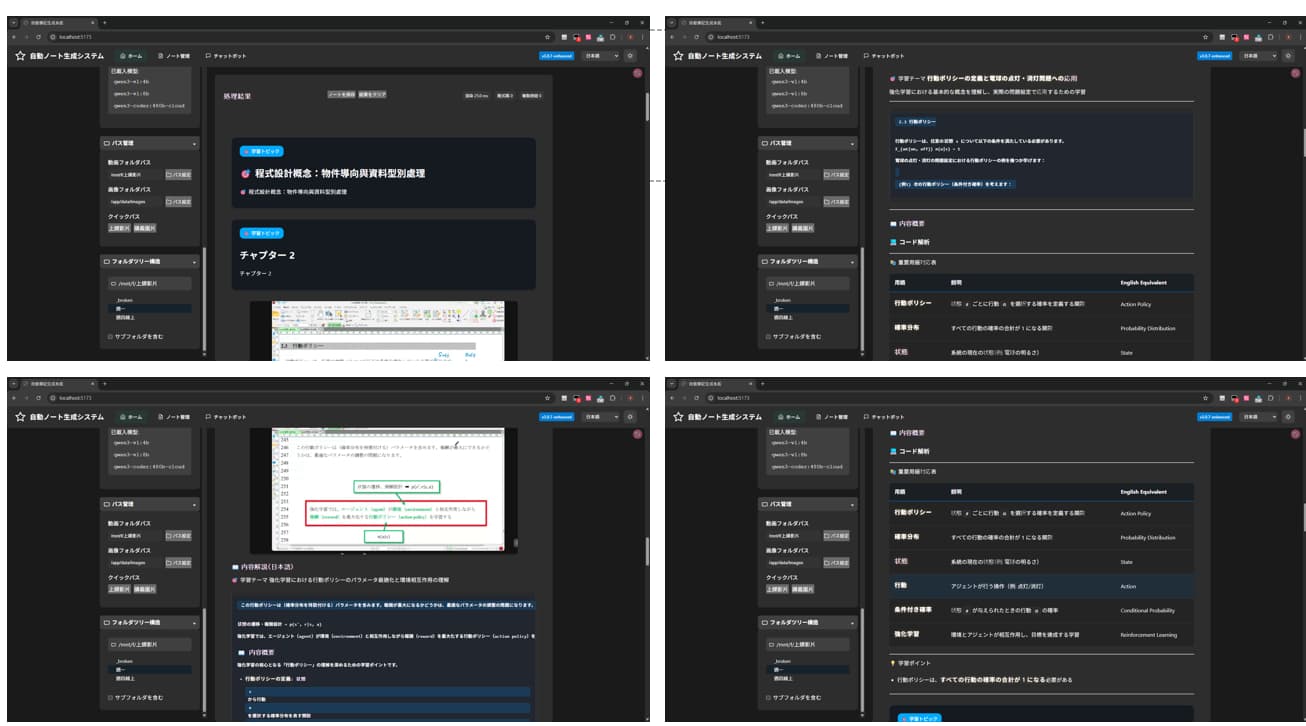
The actual screens show video input, processing status and the resulting notes.
The project was presented at graduation and reached a working demo. It runs qwen3-vl:4b locally through Ollama alongside PaddleOCR-VL. Short videos can be processed; longer videos are limited by the available local compute.
DEMO PLATES
INPUT / VIDEO LIST / NOTE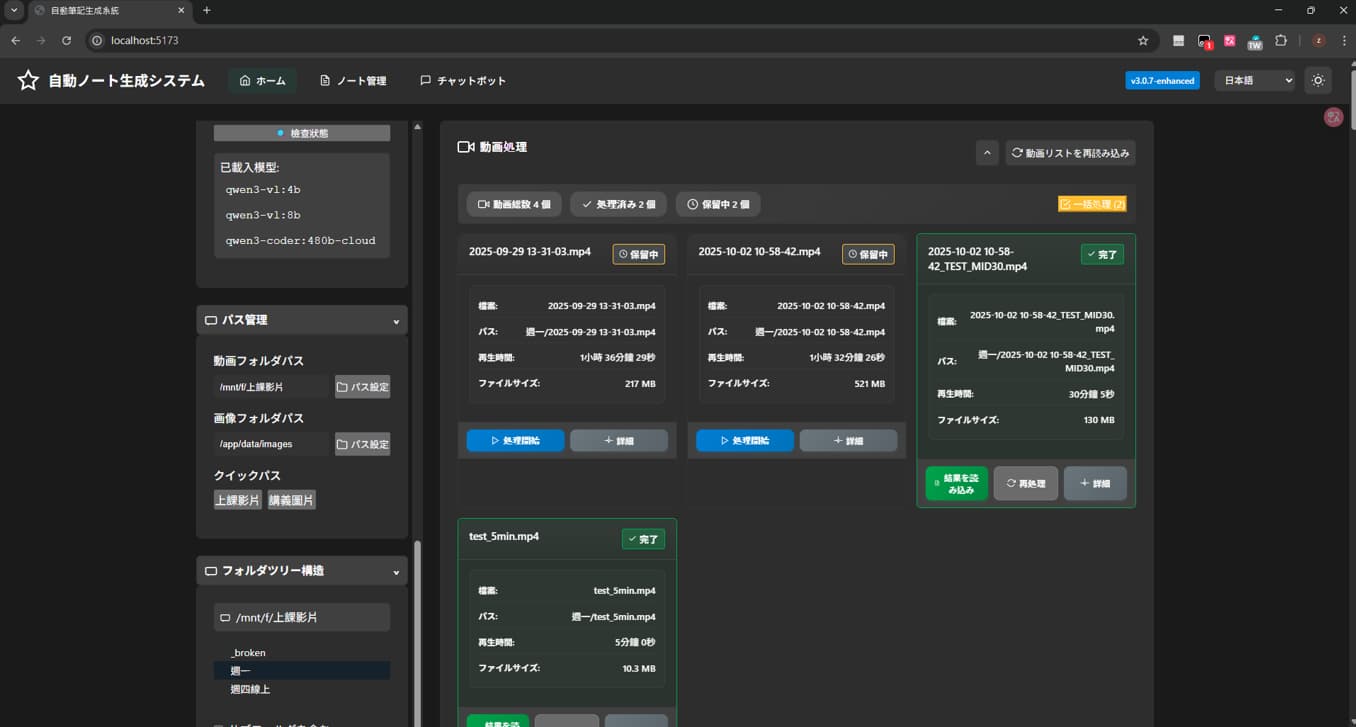
WHAT REMAINS
Confirmed01SUPPORTED
Input through structured notes
Joined through Vue 3, FastAPI and Docker.
Confirmed02SUPPORTED
The four-person split and integration calls
Cut the scope, chose the reading direction, and joined at the seams.
Confirmed03SUPPORTED
The graduation-project presentation
The presentation slides and technical report were completed and presented.
Confirmed
Record status
NOTERA / 07The close centers on the verified path from input to structured notes and the team's decisions.
CHAPTER NOTEMore than the screens, the flow from input to notes is what this project produced.NOTERA / 07 · RESULT