03PERSONAL TOOL
KIROKU
A personal management system I use daily, connecting capture, organization, search and review from Discord through OpenClaw to my NAS.
2026
CAPTURE ARCHIVE
01
Scattered records, in one place.
Observe personal friction and keep learning while making daily recording easier to continue.
Notes, calendar entries, tasks, finances, health, and diary pages can end up scattered and hard to find later. KIROKU is my attempt to bring those records together in one personal notebook.
CONCEPT / 01
WhyCalendar
Important Notes
Tasks / Reminders
Finance
Fitness / Diet
Notes
Diary / Journal
KIROKUScattered records, in one place.
02
Rethink where records begin.
Reduce input friction. Capture where you already are.
I capture daily notes in Discord. OpenClaw receives them and routes them to KIROKU and the NAS. Using a familiar inbox lowers the effort of recording, while the destinations make entries easier to find later.
- ME
- DISCORD
- OPENCLAW
- KIROKU / NAS
- CALENDAR
- FINANCE
- JOURNAL
- FITNESS
- DIET
03
First, decide where things live.
Give each of the seven domains a place for its records.
The first build gave seven areas a place for their records: Calendar, Important Notes, Tasks/Reminders, Finance, Fitness/Diet, Notes, and Diary/Journal. Knowing where something belongs makes it easier to capture.
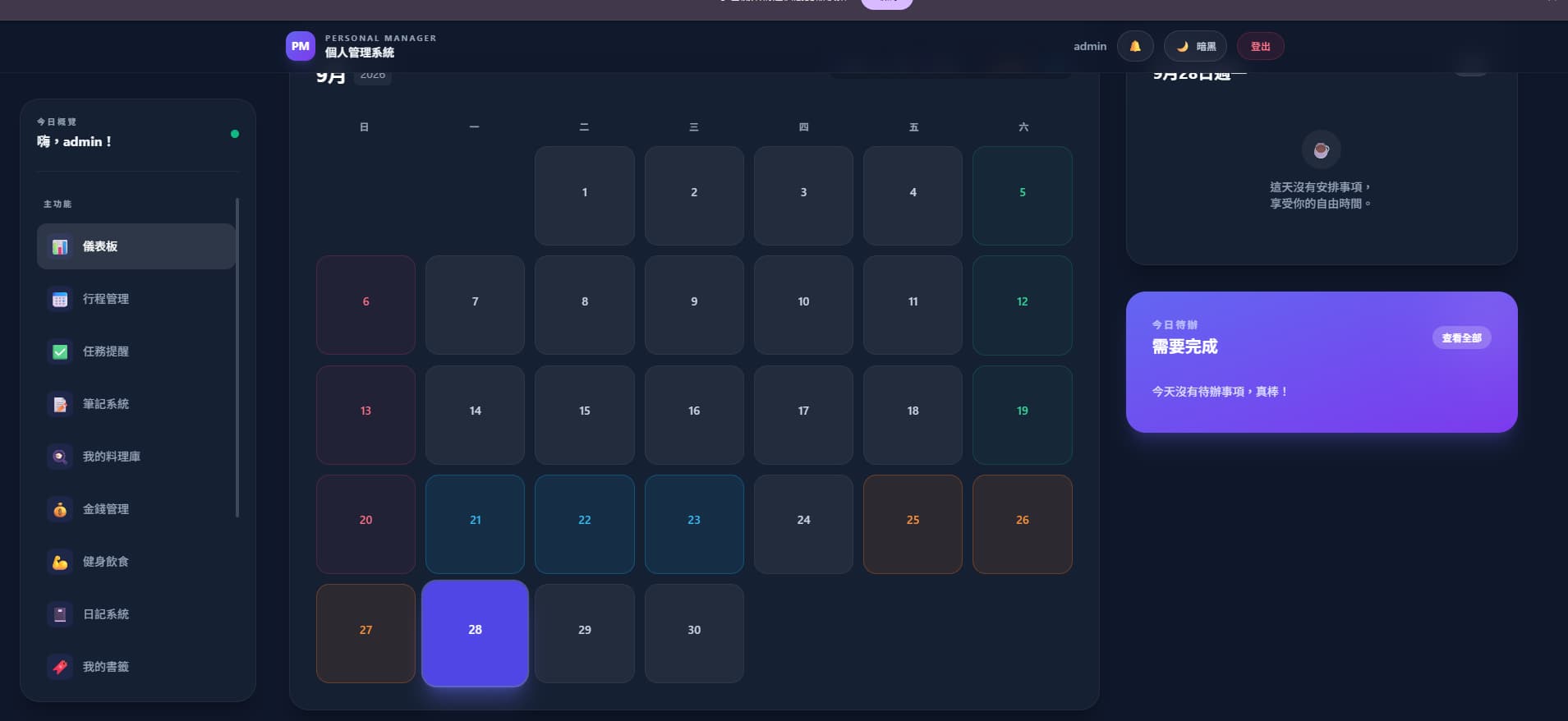
The dashboard brings together the calendar, daily schedule and tasks. Notes have a separate folder-and-card view: checking today's plans and finding reference material are different reading tasks.
DOMAINS
01CALENDAR
Calendar
A record of plans and events.
02IMPORTANT
Important Notes
Where important items to revisit are kept.
03TASKS
Tasks / Reminders
Things to do and cues to remember.
04FINANCE
Finance
A record of money in and out.
05FITNESS
Fitness / Diet
A record of movement and meals.
06NOTES
Notes
Where quick thoughts and short memos rest.
07DIARY
Diary / Journal
The daily record of thought.
04
Give recording a place it can stay.
Settle the capture place first, then observe what makes recording sustainable.
A personal tool takes shape through use. I start by making capture easy and keeping records somewhere I can revisit.
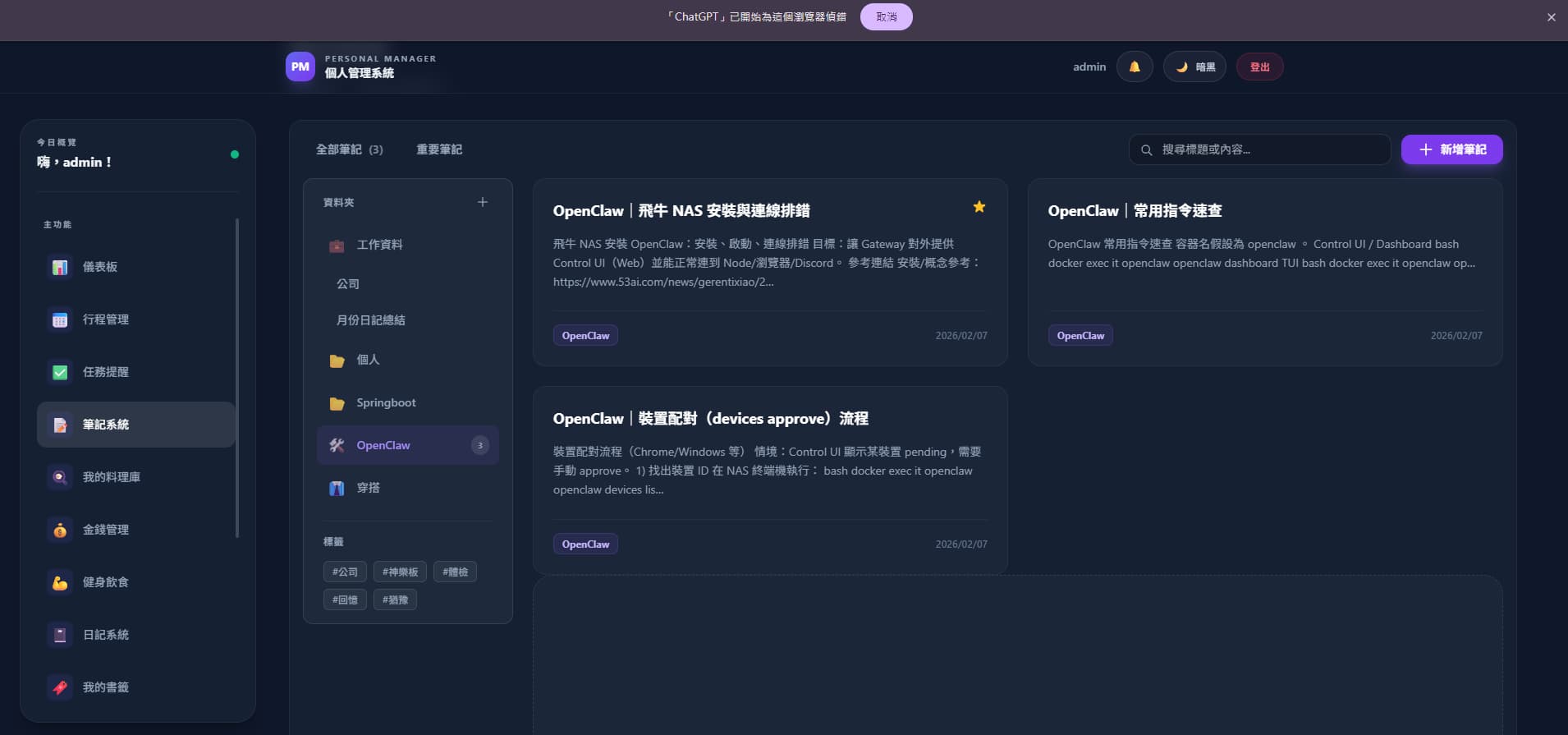
Keeping something is only useful if it can be found again. The supplied notes screen shows folders, tags, important notes and search by title or content. OpenClaw installation, connection troubleshooting and command notes can be revisited together.
- Natural language
- Discord
- OpenClaw
- Structured record
- KIROKU / NAS
USE RECORD
Confirmed / Design response01
Capture entry
Discord → OpenClaw → KIROKU / NAS
02
Daily recording
Keep capture in one familiar place
03
What continued use can confirm
Hand it to the next observation
05
Carry each small change into the next decision.
Keep observation, adjustment, and recording in a short loop as the tool takes shape.
I originally set out to build a manual personal management system. Adding OpenClaw let me write a sentence in Discord and have it understood, organized and stored on the NAS. That became the best fit for me: capture first without opening a different page for every form.
BEFORE
Manual app entry
AFTER
Say one thing → Automatically organize
06
Records stay in KIROKU and the NAS.
Written in Discord, handed through OpenClaw, kept in KIROKU and the NAS.
I use it every day and continue making small adjustments. Capture, organize, search and review are its four core jobs. Vue 3 and TypeScript handle the interface, FastAPI the backend and SQLite storage, with Docker running on the NAS. This is my daily tool rather than a commercial product.
CURRENT BOUNDARY
Confirmed / Next to verify01
Discord → OpenClaw → KIROKU / NAS
Record of use and change
02
A personal tool in learning
Revisit ease of continuation through actual records